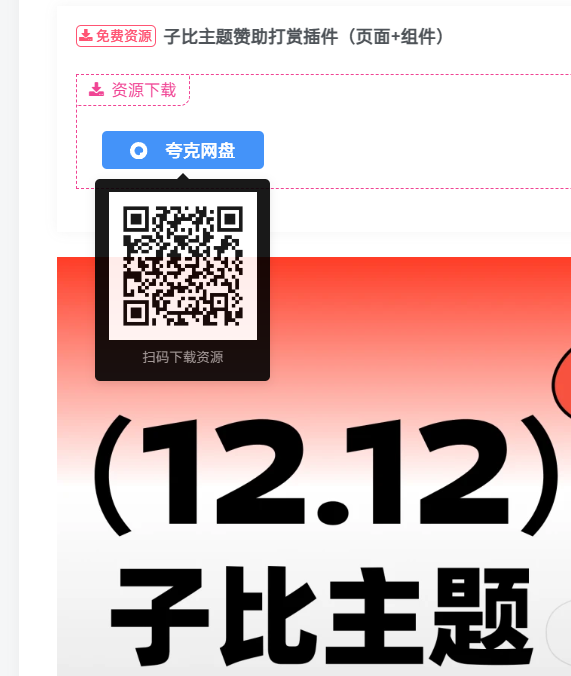
使用方法
把这个代码放在主题的 function.php
二维码使用的是我的接口,可以改成自己的:https://so.navw.cn/qrcodeapi.php?text=
https://api.qrserver.com/v1/create-qr-code/?size=100×100&data=
/** * 为资源下载按钮添加二维码 hover 功能 - 大海原创 */

add_action('wp_footer',function(){?>
<script>jQuery(function($){$('.but-download a.but[href*="pay-download"]').each(function(){var b=$(this),u=b.attr('href'),q='https://so.navw.cn/qrcodeapi.php?text='+encodeURIComponent(u),img=new Image();img.src=q;b.attr({'data-toggle':'tooltip','data-html':1,'data-placement':'bottom',title:'<div class="text-center padding-10"><img src="'+q+'" style="width:120px;height:120px;border-radius:4px;"><div class="mt6 muted-2-color em09">扫码下载资源</div></div>'}).tooltip({html:1,trigger:'manual',container:'body'}).on('mouseenter',function(){var t=$(this);t.tooltip('show');setTimeout(function(){t.tooltip('update')},50)}).on('mouseleave',function(){$(this).tooltip('hide')})})});</script>
<style>.tooltip-inner{width:140px!important;max-width:160px!important;padding:0;background:#000;border:1px solid var(--muted-border-color);box-shadow:0 2px 8px rgba(0,0,0,.1)}.tooltip.show{opacity:1}</style>
<?php });
下面是调用子比主题的接口生成二维码,会有卡顿(带缓存)
// AJAX接口:生成二维码(带缓存)
add_action('wp_ajax_get_download_qrcode','custom_get_download_qrcode');
add_action('wp_ajax_nopriv_get_download_qrcode','custom_get_download_qrcode');
function custom_get_download_qrcode(){
    if(empty($_GET['url'])){die();}
    $url=urldecode($_GET['url']);
    $cache_key='qr_'.md5($url);
    $cached=get_transient($cache_key);
    if($cached){
        header('Content-Type: image/png');
        header('Cache-Control: max-age=86400');
        echo base64_decode($cached);
        die();
    }
    ob_clean();
    require_once get_theme_file_path('/inc/class/qrcode.class.php');
    ob_start();
    QRcode::png($url,false,'L',4,1);
    $img=ob_get_clean();
    set_transient($cache_key,base64_encode($img),DAY_IN_SECONDS);
    header('Content-Type: image/png');
    header('Cache-Control: max-age=86400');
    echo $img;
    die();
}

add_action('wp_footer',function(){?>
<script>jQuery(function($){var a='<?php echo admin_url('admin-ajax.php'); ?>';$('.but-download a.but[href*="pay-download"]').each(function(){var b=$(this),u=b.attr('href'),q=a+'?action=get_download_qrcode&url='+encodeURIComponent(u);b.data('qr',q).on('mouseenter',function(){var t=$(this);if(!t.data('init')){t.attr({'data-toggle':'tooltip','data-html':1,'data-placement':'bottom',title:'<div class="text-center padding-10"><img src="'+t.data('qr')+'" style="width:100px;height:100px;border-radius:4px;"><div class="mt6 muted-2-color em09">扫码下载</div></div>'}).tooltip({html:1,trigger:'manual',container:'body'});t.data('init',1)}t.tooltip('show')}).on('mouseleave',function(){$(this).tooltip('hide')})})});</script>
<style>.tooltip-inner{width:120px!important;max-width:140px!important;padding:0;background:#000;border:1px solid var(--muted-border-color);box-shadow:0 2px 8px rgba(0,0,0,.1)}.tooltip.show{opacity:1}</style>
<?php });